Guardrails, governance and compliance review
Guardrails define what an agent may spend. Governance defines who sets those limits, who approves exceptions and who reviews the activity. Payment records help the enterprise assess what happened.
AgntPymt brings these controls into the enterprise agent payment workflow. Its current testnet product demonstrates spending caps, approval thresholds, pause controls and payment records. These support compliance review; they are not regulatory certification or a guarantee of compliance.
Define the task before the budget
A useful payment policy starts with a specific job. “Buy the data needed for this research task” is easier to review than an open-ended instruction to acquire anything useful.
Write down what the agent should accomplish, what it may need to pay for and which decisions should return to a person. This creates a basis for choosing controls instead of copying a limit that was designed for someone else’s workflow.
Separate spending caps from approvals
A spending cap defines a boundary. An approval threshold identifies requests that need a person’s attention. They answer different questions: how much authority the agent has, and when a person should review its use.
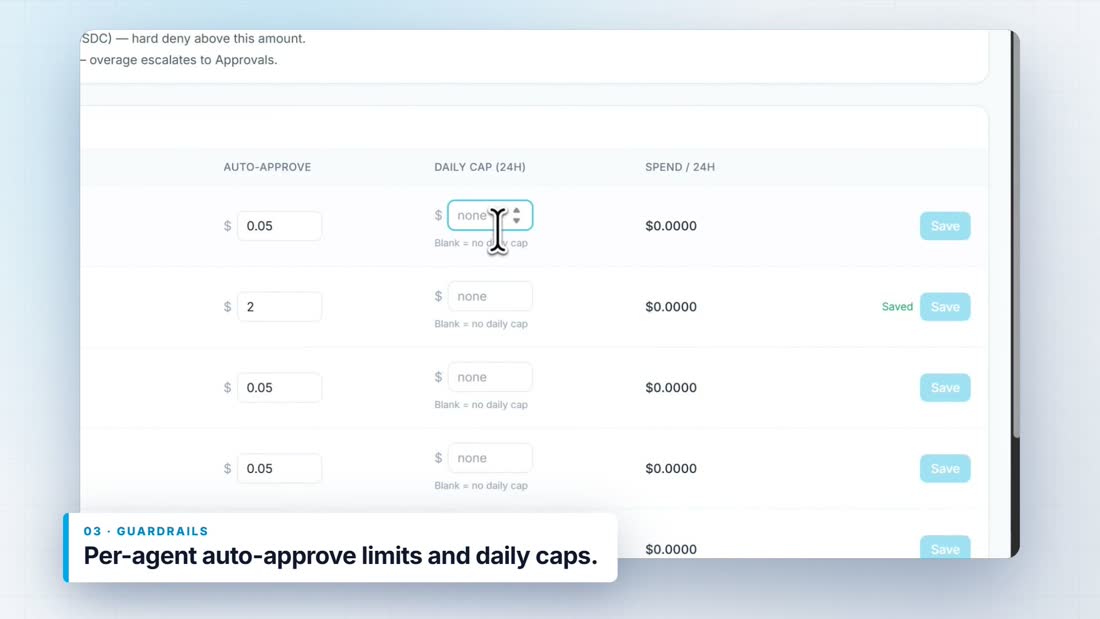
The AgntPymt demonstration shows daily caps, per-agent approval thresholds and organisation-wide limits. Set controls that fit the task and inspect the resulting configuration before using the agent.
- Choose a small initial cap for the test workflow.
- Set an approval threshold that keeps unfamiliar requests visible.
- Review organisation limits alongside individual agent settings.
Know how to pause and inspect activity
If requests stop matching the intended task, pause the agent and review its activity before continuing. A pause control is useful only if the team knows where to find it and who is responsible for responding.
AgntPymt’s demo shows a pause control, transaction references and agent run logs. Use those records to connect the requested task with the payment activity it produced. A transaction record on its own does not explain whether a purchase was appropriate.
Manage controls where you work
You can set guardrails on the AgntPymt platform or through your connected agent in Claude Code, Codex, Hermes, Cursor or OpenCode. Use whichever interface makes it easier to understand and review the change.
For example, you could ask your connected agent to set a daily spending cap and an approval threshold. Check the saved values in AgntPymt afterwards. The wording of a prompt is not a substitute for confirming the resulting policy.
A concrete example: budget versus approval
The website simulation uses a remaining budget of 50 test RLUSD and an auto-approval threshold of 25. These are illustrative settings, not product defaults. The examples below are independent requests with no previous spend.
| Request | Amount (test RLUSD) | Decision |
|---|---|---|
| Research data | 12 | Auto-approved: within budget and threshold |
| API access | 28 | Human approval: within budget, above threshold |
| Compute credits | 72 | Blocked: exceeds remaining budget |
| Any request while paused | Any | Blocked until the agent resumes |
Test the boundaries on a test network
AgntPymt supports Base Sepolia and XRPL testnet. Use test assets to try requests within your cap, above your approval threshold and while the agent is paused. Record what happened and investigate any result that differs from your intended policy.
This is a starting checklist for evaluating your own workflow. It does not imply that every failure mode is covered or that a testnet result establishes production readiness.
Put it into practice.
Explore enterprise guardrails, approval controls and payment records for your AI agents. Email our team to arrange a demo.
Request demo